
Social Media

Friday, January 9, 2015

How I Upload Articulate Files to Google Drive

One of the best and easiest ways for me to share content with others is Google Drive (NOT the newest version). It's free and if you don't need to worry about copyright issues it's fast and easy. An important fact to note is that Google Drive (unsurprisingly) works best with Google Chrome browsers. It's also suppose to work on Firefox, Safari (not supported on Windows) and Internet Explorer per Google but expect a higher likeliness of experiencing "bugs".

Here are the steps I follow to upload my Articulate Output for viewing on Google Drive:

1. Create a folder and name it on your Google Drive


A. Go to Create and select the Folder option.


B. When the pop up appears name your folder and select Create.


2. Mark the folder as public


A. Select the folder


B. From the More menu select Share and then Share again


C. Select the Advanced option.


D. From the sharing settings window select Change.... in the who has access section.


E. From the link sharing window select On - Public on web and then Save.


F. Select Done to exit out of sharing settings.


3. Drag my Storyline output files into folder


A. Open the folder by clicking or right clicking and selecting Open


B. Drag your output files into the drop location (I suggest all at once using Control A).
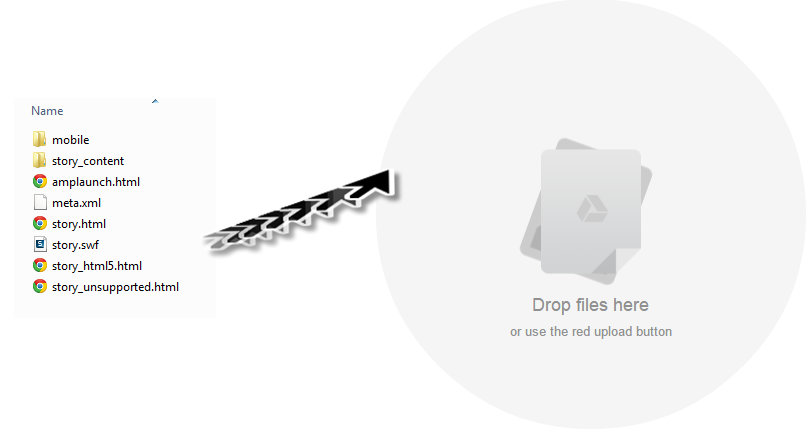


C. When prompted select Upload and share to set your items at the same permission as the folder.


D. Don't convert any document or text and select Start upload


E. Wait for your items to completely upload.


4. Change the Output file


A. Select the Story.html, right click and select rename.


B. In the field enter Index.html.


C. Select Ok.


Please note:
Presenter: rename player.html
Quizmaker: rename quiz.html
Engage: rename engage.html

5. From the web window copy the folder name at the end of the link


6. Enter www.googledrive.com/host/ and then enter in your folder name


7. Quality Check


Would you like to see a demo of this course? Click here

Tuesday, January 6, 2015

Why I Love the Articulate eLearning Heroes Challenges (2014 Recap)

When I first discovered the Articulate Community it was July/August of 2014.  I had only been exposed to Lectora for most of my career but I wondered what else was out there. I heard the buzz of Articulate Storyline and Adobe Captivate and it peaked my interest. I downloaded brief trials in previous years but just for curiosity sake and not testing. But I wanted something more! To learn the software, make examples, find a new place to communicate with other professionals and keep me glued to my email and Twitter for the um teenth reason. I kept telling myself "you've been wanting to up your professional development game", "you've been wanting to take a deeper dive into other software" and "these would make great portfolio pieces" but something held me back. One day after reading someone's encouraging comment that boiled down to "You just need to do it" I finally threw my hands in the air and wrote a blog post for an entry. From that moment on the Community and Challenges became my eLearning crack (sorry for the analogy but I can't think of anything better to explain it!).

I think what I love most about the Community is that the knowledge shared always seems to be right when I need it. I seriously thought the members were tapping into my computer for awhile and using my upcoming article ideas spreadsheet for their own use. Some of the other articles seemed to come from left field but still made so much sense. It has opened up my eyes to what I can do and it's helping to build my confidence as a developer. I figured it would be a good idea to share what I have gained from this experience and hopefully inspire someone who hasn't joined the Community or published their first challenge to JUST DO IT! You'll feel welcomed, accomplished and satisfied, I promise.

First: 


Challenge: #45 - Audio Recording Tips

Entry: Article

Easiest:


Challenge: #48 - Storyboard Template

Entry: PowerPoint Download

Reason: I already had this lying around so I spruced it up and reviewed it before sending it off to the masses.

Most Challenging:


Reason: My brain went way to complicated on the idea. Then the image collection was hard because I tried to find a full set so I wouldn't lose the general look and feel of the food or cooking items.  Not to mention editing them when I finally found the right style. I really wish I would of just been able to use a Vector pack but hey it took me out of my comfort zone and I learned a new investigative skill lol

Favorite:


Reason: I love taking eLearning and making it "editorial". So many times you still see the zaney PowerPoint graphics or horribly posed stock images.  Doing this challenge really made me think like a designer, pay attention to how I presented things, and maintain the feel of a magazine. This entry was the one I spent the most time on but is also one I'm really proud of.

Honorable Mention:


Reason: I took what I made in the challenge and turned it into a full course I loved it so much! What can I say....I heart Twitter!

Did you participate? What was your favorite? Comment below or find me on Twitter (@jvalley0714)

Friday, January 2, 2015

Blogging for a Year and What's to Come in 2015

I can't believe I missed my blogiversery. Oh the woes of starting something over Christmas break! As of 12/22 this blog is officially one years old.  I want to thank each and every one of you who check out my blog weekly, talk to me on social media or even the one who occasionally wanders in.

I started this blog as a way to learn more about the field of online education/learning and development/corporate training/adult learning/elearning or whatever you call it and ended up making some great friends and allies, learning about new companies and products, and learning new things about eLearning and myself as an Instructional Designer. What more could a girl ask for?  I wanted to share some quick stats with you and hope that you share in my excitement.

Thank you! Thank you! Thank you!


I will definitely continue to blog through 2015 and I'm hoping to eventually bump up my posting frequency to twice a week.  Here are some of my 2015 goals that have to do with my journey in eLearning and this blog:
  • Build "own" email campaigns (Mailchimp, why are you so intimidating!)
  • Change blog and social media style/branding (responsive? flat?)
  • Switch site providers (Wix, Squarespace, Weebly)????
  • Create and distribute at least one eBook
  • Do more product reviews
  • Do book reviews
  • Finally write this massive article I've been collecting resources and silently thinking about the structure and subject matter of for months!
  • Incorporate software tips and tricks into a series (this is my chance to start making Youtube videos)!
  • Dump Blog's Facebook or start engaging on there more
  • Get a Bachelors degree???
  • Attend a conference
  • Clean up Pinterest boards
  • Guest blog
  • Submit an article to one of the eLearning magazines
  • Stay top contributor on my favorite LinkedIn group as much as possible
  • Publish an article to LinkedIn

What are you planning on doing on our blog or in your life this year?  Comment below or catch me on Twitter @jvalley0714

Share!